Smart Thread Hiding: The Secret to Lightning-Fast ChatGPT Responses

ChatGPT gets noticeably slower as conversations grow longer. What starts as instant responses gradually degrades to 10-15 second delays after 30-40 messages. This happens because ChatGPT's interface processes and renders the entire conversation history with each response - the more messages, the more lag.
For power users having deep technical discussions or iterative work sessions, this becomes a serious productivity killer. You're forced to either start new chats constantly (losing valuable context), manually delete old messages (tedious and breaks flow), or just accept the lag.

The Solution: Smart Thread Hiding
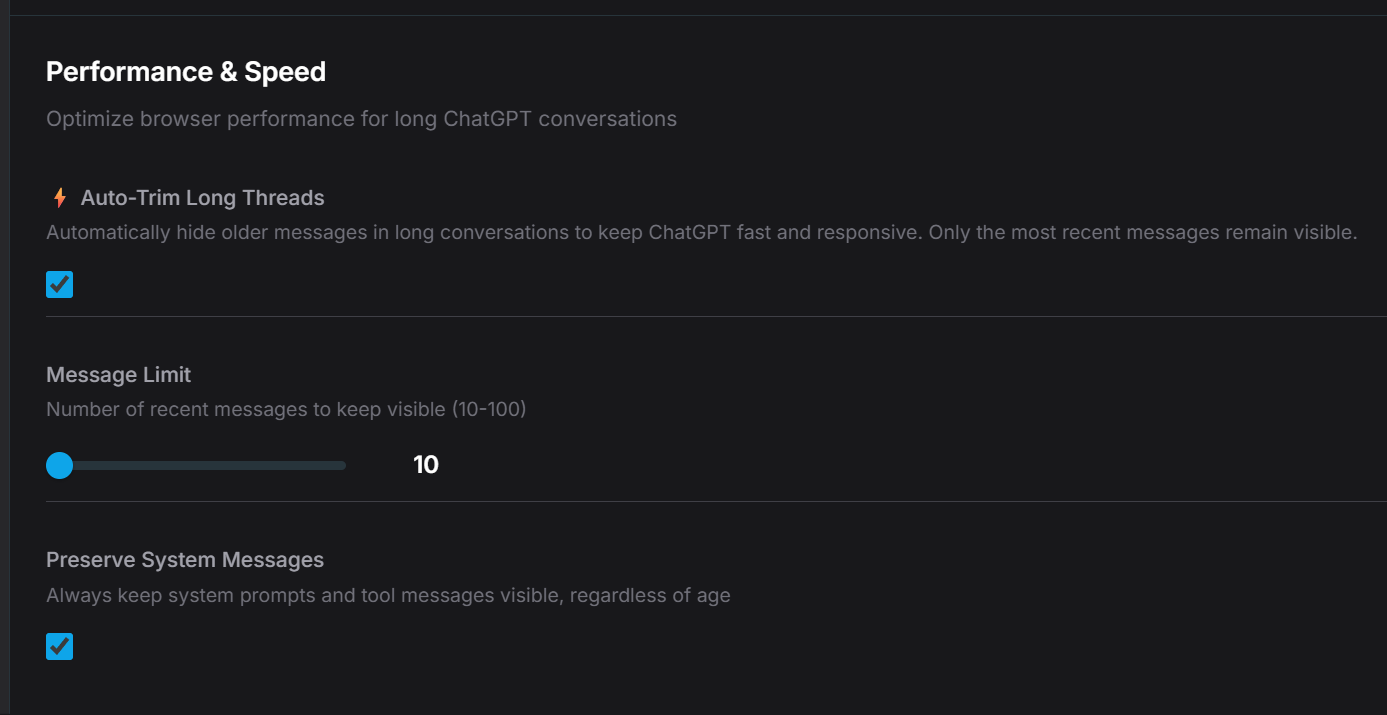
AI Workspace Pro's Smart Thread Hiding feature automatically manages conversation length to maintain ChatGPT's responsiveness without losing your conversation history.
How it works:
- Set your preferred visible message count (e.g., 10-15 recent messages)
- Toggle on Smart Thread Hiding
- Older messages are hidden from the DOM - not deleted, just made invisible
- ChatGPT processes only visible messages → instant speed boost
- Toggle off anytime to restore full conversation view

Key Benefits
- ✅ 10x faster responses - Even in 100+ message conversations
- ✅ No context loss - Full history preserved, just hidden
- ✅ Automatic - Set it once, forget about it
- ✅ Reversible - Toggle off to see full conversation anytime
- ✅ Smart - Keeps most recent context where it matters
Technical Explanation
ChatGPT's frontend renders and processes every message in the conversation DOM tree when generating responses. By selectively hiding older messages from the DOM while keeping them in local storage, we reduce the browser's rendering workload without affecting ChatGPT's server-side processing.
The result: ChatGPT "sees" a shorter conversation and responds as if it's a fresh chat, while your complete history remains intact and retrievable.
Real-World Use Case
Before Smart Thread Hiding
- • Developer working on debugging session
- • After 40 messages: 15+ second wait per response
- • Forced to start new chat, losing debugging context
- • Copy-pasting previous findings manually
With Smart Thread Hiding
- • Same 40+ message session
- • Responses arrive in 2-3 seconds consistently
- • Full debugging history preserved
- • No workflow interruption
Feature Comparison
| Approach | Speed | Context | Manual Work | Reversible |
|---|---|---|---|---|
| Start new chats | ✅ Fast | ❌ Lost | ⚠️ Constant | ❌ No |
| Manual deletion | ✅ Fast | ⚠️ Partial | ❌ Tedious | ❌ No |
| Do nothing | ❌ Slow | ✅ Full | ✅ None | - |
| Smart Thread Hiding | ✅ Fast | ✅ Full | ✅ None | ✅ Yes |
User Testimonials
"I thought I was going crazy - ChatGPT would just hang for 10+ seconds after long sessions. Smart Thread Hiding fixed it completely. Game changer for technical work."
"Finally I can have those deep, 50+ message conversations without the lag. This should be built into ChatGPT by default."
FAQ
Q: Does this delete my messages?
A: No. Messages are hidden from view, not deleted. Toggle off Smart Thread Hiding anytime to see your complete conversation.
Q: Will ChatGPT remember the context from hidden messages?
A: Hidden messages are not sent to ChatGPT's API. Only visible messages count as context. For most use cases, the last 10-15 messages provide sufficient context.
Q: Can I customize how many messages stay visible?
A: Yes. Set your preferred message count in settings (recommended: 10-15 messages).
🚀 Stop choosing between speed and context
Smart Thread Hiding is available now in AI Workspace Pro. Install the extension and keep your long conversations lightning fast.
Ready to upgrade your workflow?
Join thousands of power users who trust AI Workspace to organize their prompts and conversations securely.
Install for Free