Reference Chats: Bring Context from Previous Conversations into New Chats with One Click

We're excited to introduce Reference Chat – a powerful new Pro feature that transforms how you work with AI across multiple conversations. With a single click, you can now reference entire previous conversations in your current chat, giving the AI complete context without manual copy-pasting.
The Problem We're Solving
Working with AI assistants often requires building on previous conversations. Until now, you had two frustrating options:
- Manually copy-paste entire conversations (time-consuming and error-prone)
- Start from scratch and lose valuable context (inefficient and incomplete)
Both approaches break your workflow and limit what you can achieve with AI.
Introducing Reference Chat
Reference Chat makes it effortless to bring context from any previous conversation into your current chat. Here's how it works:
How to Use Reference Chat
- Open any chat in your vault sidebar
- Right-click on the conversation you want to reference
- Select "Reference this chat" from the context menu
- The conversation is instantly attached to your current chat as a text file
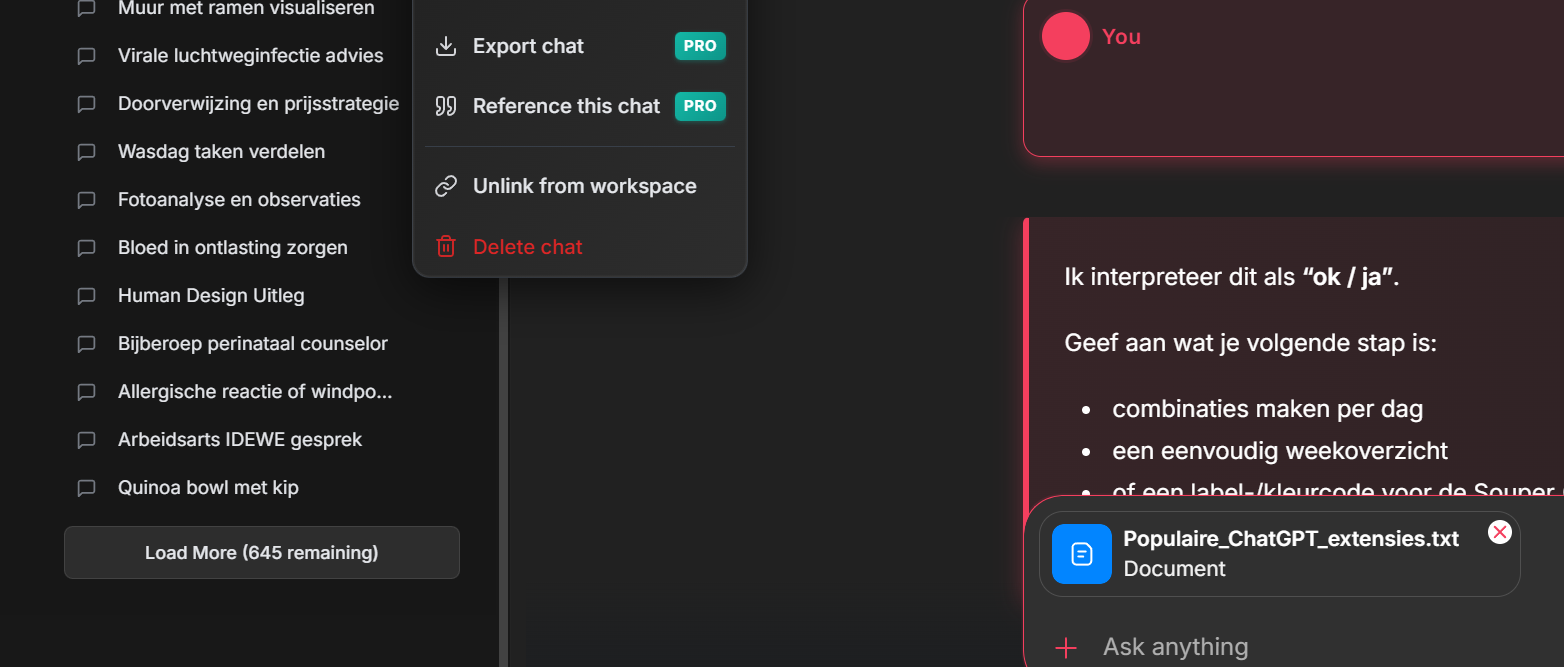
That's it! The AI now has full access to the referenced conversation and can reason across both chats.
Real-World Use Cases
Complex Research & Analysis
Build comprehensive reports by referencing multiple research conversations:
- Reference a technical discussion from last week
- Add insights from a brainstorming session
- Combine findings from different expert consultations
Software Development
Continue code discussions across multiple sessions:
- Reference architecture decisions from previous chats
- Connect bug fixes to original feature discussions
- Link implementation details across sprint conversations
Content Creation
Build cohesive content by connecting related discussions:
- Reference tone guidelines from brand strategy chat
- Connect product benefits discussed in earlier sessions
- Link audience insights from research conversations
Legal & Professional Work
Maintain context across complex case work:
- Reference precedent discussions from previous analyses
- Connect client requirements across multiple consultations
- Link research findings to current case strategy
Why Reference Chat is Powerful
-
✅
One-Click Simplicity
No more copying, pasting, or manually formatting previous conversations. Reference any chat with a single click. -
✅
Full Context Preservation
The entire conversation is attached – nothing gets lost or summarized incorrectly. The AI sees everything exactly as it happened. -
✅
Multi-Conversation Reasoning
Ask questions that span multiple conversations. The AI can compare, contrast, and synthesize information across all referenced chats. -
✅
Time-Saving Workflow
What used to take 10+ minutes of copy-pasting now takes seconds. Stay in your flow and focus on thinking, not administrative tasks.
Pro Feature
Reference Chat is available exclusively for AIWorkspace Pro users.
What Our Users Are Saying
"Reference Chat has completely changed how I work with AI. I can now build complex analyses that span weeks of conversations without losing any context."
"As a developer, being able to reference architecture decisions from previous chats while discussing implementation details is game-changing."
Upgrade to Pro Today
Ready to unlock the full power of context-aware AI conversations? Upgrade to AIWorkspace Pro and start using Reference Chat today.
Frequently Asked Questions
- Q: How many conversations can I reference in a single chat?
- A: There's no limit! Reference as many conversations as you need for your work.
- Q: Does this work with all conversation lengths?
- A: Yes, Reference Chat works with conversations of any length.
- Q: Is my conversation data sent to any servers?
- A: No, Reference Chat works entirely locally. Your conversations are never sent to external servers.
Ready to upgrade your workflow?
Join thousands of power users who trust AI Workspace to organize their prompts and conversations securely.
Install for Free